I Built a Figma Plugin That Doesn't Need an API Key
A copy-paste bridge between browser AI and editable Figma components.
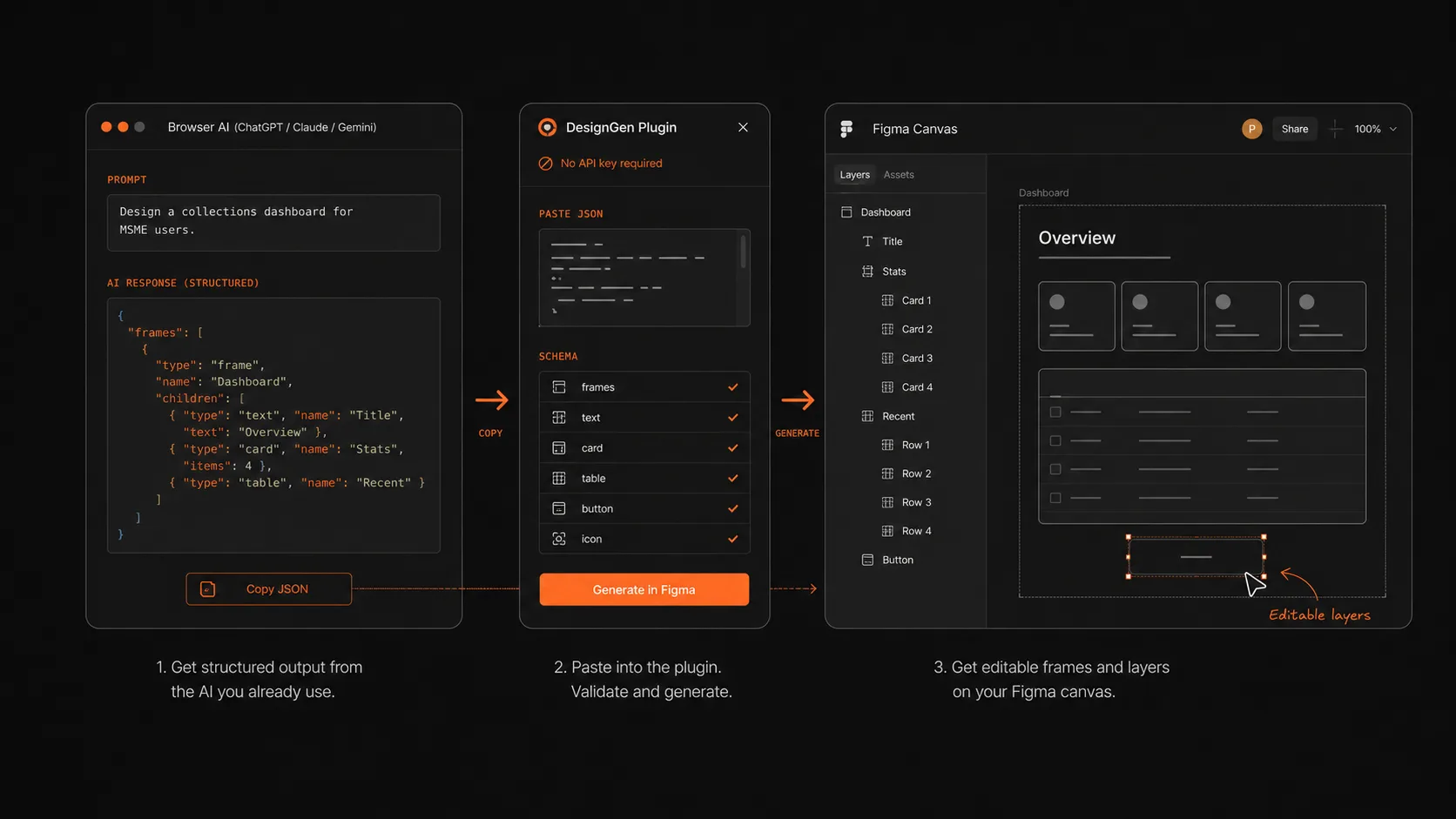
Every AI design tool asks designers to bring an API key, a billing account, or a new workflow. DesignGen takes a smaller bet: designers already have browser AI open, so the plugin turns that output into editable Figma layers.
01
The blank canvas problem is not an API problem
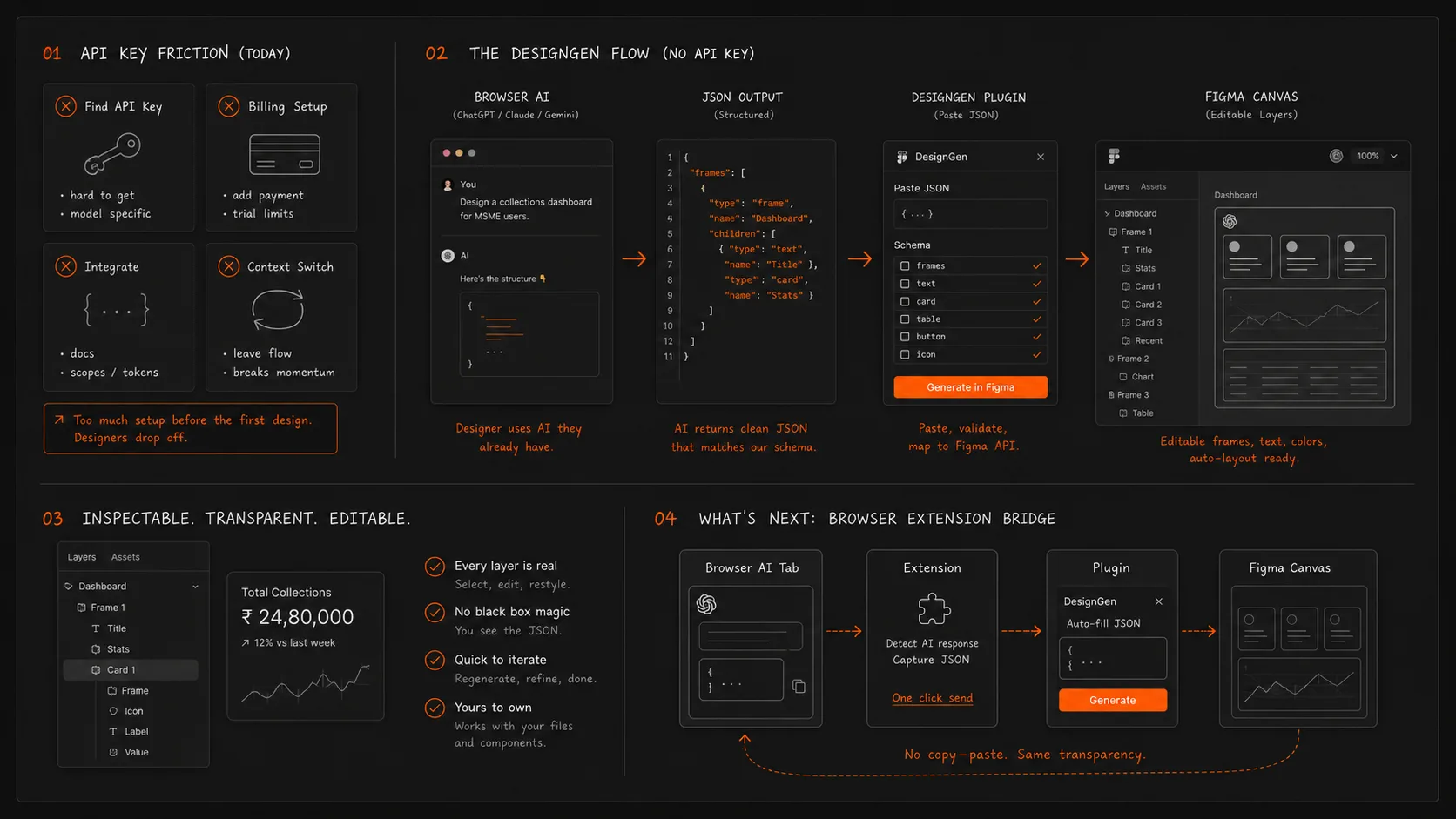
Most AI tools for Figma start with the same bargain: create an account, connect billing, paste an API key, and only then see whether the tool is useful. Before a designer gets a single frame on the canvas, the product has already asked for trust, money, and setup time.
That felt backwards. The AI capability was not missing. Designers already had ChatGPT, Claude, or Gemini open in another tab. The missing piece was a clean way to move structured AI output into Figma without turning every experiment into an integration project.
DesignGen was built around that narrower problem. It does not try to own the AI relationship. It writes a strong prompt, accepts structured JSON back from the tool the designer already uses, and turns that JSON into real Figma layers.
02
The useful insight: AI output is the product boundary
Designers do not need the model to live inside Figma. They need the output to become editable inside Figma. Once that distinction is clear, the architecture becomes much simpler.
The plugin asks the AI for a strict schema: frames, text layers, rectangles, fills, typography, spacing, and hierarchy. The response is pasted back into the plugin, normalized, validated, and rendered through the Figma Plugin API.
The result is intentionally rough. It is a starting point with editable text, colors, and auto-layout choices, not a polished image. That matters because a designer can argue with a rough frame. A blank canvas gives you nothing to react to.
03
The copy-paste step is a limitation and a feature
At first, copy-paste felt like the compromise. The user switches to their browser AI, pastes the generated prompt, copies the JSON response, and brings it back to Figma.
But that manual relay also keeps the interaction transparent. The designer can inspect the prompt before sending it, edit the request, and see exactly what the model returned before the plugin builds anything. A fully automated API flow would hide those choices.
For early versions, that visibility is valuable. It makes the tool easier to debug and easier to trust because nothing mysterious happens between the prompt and the canvas.
04
The hard part was tolerance
AI models are good at structured output until they are not. A color may come back as hex in one response and RGBA in another. JSON may arrive wrapped in markdown. A layer may include extra keys the plugin did not ask for.
The parser had to be forgiving without becoming careless. It normalizes common variations, rejects impossible structures, and returns errors that explain what needs fixing instead of dumping a technical stack trace into a tiny plugin panel.
That defensive layer turned out to be the actual product quality. The generation prompt gets attention, but the recovery path determines whether the tool feels usable.
05
What comes next
The next version should reduce the manual relay without giving up the core premise: no API key required. A browser extension can detect the AI tab, pass the prompt, capture the response, and return it to the plugin.
That makes the bridge invisible while keeping the AI under the user’s existing account and subscription. The designer still uses the model they already trust. DesignGen simply stops making them carry JSON across the gap.